Contents · 7 sections
1What problem is it really solving?2The pipeline: demonstration and learning joined by the contact surface3Why align contact surfaces first?4Why should the policy predict contact surfaces rather than joints?5Does it actually work better?6Limitations as I see them7How a robotics or dexterous-hand team could try itSHARE

This paper makes human demonstrations actually teach a robot hand with a different shape, not by making the robot hand copy the human hand's pose, but by making both hands perform the same motion on the same fingertip contact surface. CIMI (Contact Imitation Interface, the authors' framework for demonstration capture plus policy learning) fits human and robot fingers with identically shaped fingertip modules that carry small cameras. During demonstrations it tracks how these contact surfaces move; when converting to robot motion it aligns the contact surfaces first; and the learned policy directly predicts how the contact surfaces should move next. Across six hand-task pairs on LEAP (a common open-source four-finger robot hand) and Wuji, mean full-task success rises from 30.8% (same cameras, but directly predicting wrist and joint motion) to 80.8%. Changing only the conversion so that it aligns contact first cuts the contact error in coin picking from 14.67 mm to 0.51 mm. Teams building dexterous robot-hand data should read it, because each of these changes can be moved into an existing capture pipeline on its own.
What problem is it really solving?
Take an illustrative scene: a coin lies flat on a table, and a person wearing the fingertip modules wedges the edges of the thumb and index contact surfaces under it, then pinches it up. That is easy for a human, but handing this demonstration to a four-finger robot hand causes trouble. The robot's fingers are thicker and its joints sit elsewhere. If the conversion first fixes the robot wrist so its context camera matches the human-side view and then only adjusts the fingers, the fingertip contact ends up well off (about 15 mm on average for the coin, per Table III). For wedging under a coin, that much error means not getting under it at all.
| What the conversion aligns first (illustrative) | How the robot hand looks | Fingertip contact | Coin wedging result |
|---|---|---|---|
| Wrist and camera position | Very close to the human pose | Over a centimetre off | Fingertip pushes against the coin edge |
| Fingertip contact surface | Wrist slightly shifted | Nearly coincident | Gets under the coin |
The real data in the paper's Table III match this illustration: fixing the wrist first and then adjusting fingers gives 0% success on both the wedge and lift stages of coin picking.
Filming bare hands or wearing gloves lets people move naturally but loses the contact sequence in conversion, while teleoperation and exoskeletons record directly usable actions but need dedicated hardware and constrain the human to the robot's joints. CIMI instead lets people move nearly freely while recording contact data that line up directly with the robot hand.
The pipeline: demonstration and learning joined by the contact surface
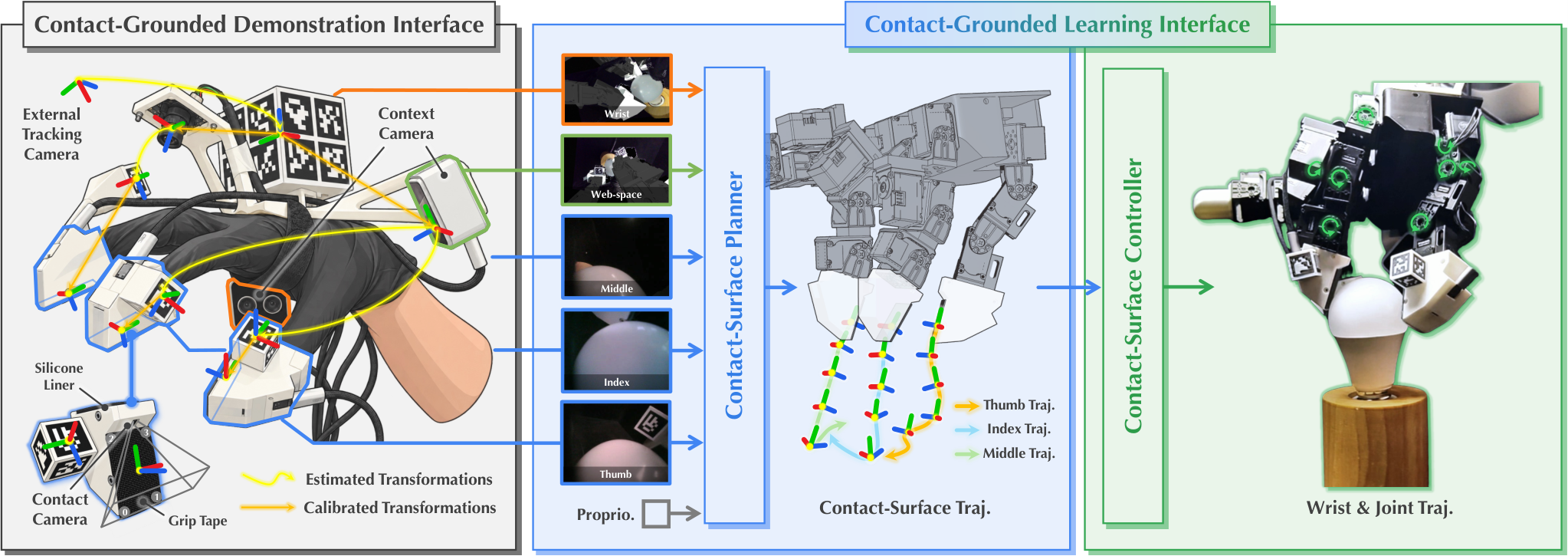
First the key concept. The contact surface is the flat pad on each fingertip module that touches objects; the module worn on the human finger and the one mounted on the robot finger have exactly the same pad shape and size. At the root of each module a small colour (RGB) camera looks along the pad and films the local fingertip-object contact; the paper calls it the contact camera. Two stereo cameras at the wrist and the thumb-index web space film the wider scene; the paper calls them context cameras. The shared contact surface gives human and robot hands a common reference that can be aligned to the millimetre.
| Stage | Input | What it does | Output |
|---|---|---|---|
| Demo: tracking | Demonstration video and fingertip markers | Estimates marker poses, composes them with calibrated transforms, and expresses each contact surface's per-frame pose in the external tracking camera's frame, the same frame used to optimize the robot trajectory | Human contact-surface trajectories |
| Demo: conversion | Human contact-surface trajectories | Jointly optimizes robot wrist and fingers so robot contact surfaces match the human ones | Robot wrist and joint trajectories |
| Demo: view conversion | Context-camera recordings | Reprojects images to the robot viewpoint and draws the robot hand in | Robot-view training images |
| Learning: planner | Contact and context images, contact-surface poses relative to the thumb | Predicts how each contact surface moves over the next 16 steps | Contact-surface trajectory |
| Learning: controller | Current joint angles and the predicted trajectory | Converts it into wrist and finger commands in one forward pass | Executable motor targets |
The key split: the planner only decides how the contact surfaces should move, and the controller only decides how this hand's joints get them there.
Why align contact surfaces first?
The conversion step has to decide how the robot wrist and fingers should be posed to reproduce the human motion. A common approach first fixes the robot wrist trajectory so that the robot-side context camera pose matches the human-side context camera pose, giving both views the same angle, and then adjusts only the finger joints to approximate the contact. Once the wrist is fixed, though, the fingers have little room, and the robot fingertips often cannot reach where the human fingertips were.
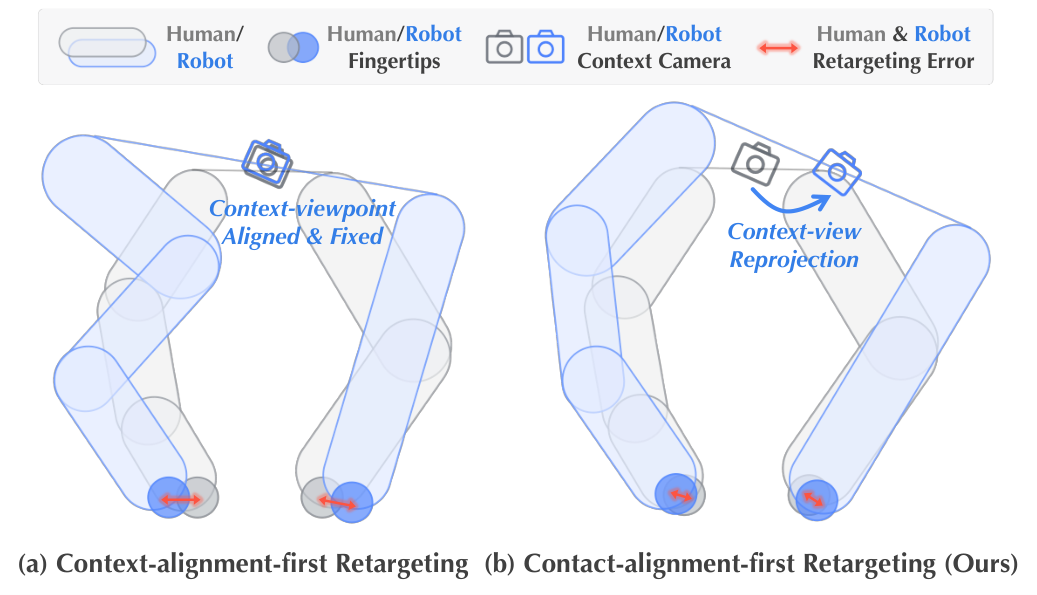
CIMI frees the wrist and optimizes it together with the finger joints. The goal is to make the four corners of each robot contact surface coincide with the tracked four corners of the human one, while penalizing sudden changes of wrist and joints between neighbouring frames to avoid jitter:
Here is the wrist pose at frame , the finger joint angles, computes where corner of finger 's contact surface lands given both, is the matching human corner, and is the smoothness term. The intuition is simple: if all four corners coincide, both position and orientation of the surface match.
Why four corners rather than one centre point? Matching only the centre leaves the surface free to rotate around it. Table III tests both choices. On bulb installation, with contact aligned first, matching centres gives 4.36 mm of contact error and 20% final success; matching four corners cuts the error to 1.09 mm and lifts success to 90%. Constraining both position and orientation of the contact surface helps a lot on regrasp-heavy motions like installing a bulb.
Moving the wrist also moves the context cameras, so their views no longer match what the human recorded. CIMI fixes this offline: it estimates depth from the stereo images, lifts the image into a coloured point cloud, reprojects it from the robot wrist's new pose, and overlays a rendering of the robot hand. Contact-camera images are kept as recorded, because both sides share the surface and camera mounting, so the view relative to the contact surface is already the same.
Why should the policy predict contact surfaces rather than joints?
Typical policies directly output relative wrist motion and joint changes. The paper observes that on high-degree-of-freedom hands this leads to poor wrist-finger coordination and misaligned contact, because one visual model has to learn both how contact should move and how this hand's kinematics realize it.
CIMI splits the job into a planning layer and a control layer. The planner is a flow-matching model. It has two kinds of input: features from a frozen visual backbone for each camera view, and each finger's contact-surface pose relative to the thumb. That pose is computed by forward kinematics from the converted robot trajectories during training, and from the robot's current joint angles during execution. The planner outputs the relative motion of each contact surface for the next 16 steps. All 16 steps use the contact surface's own frame at the moment of prediction as reference, for both translation and rotation, rather than each step being relative to the previous one. The training labels come from the converted robot trajectories: forward kinematics gives the robot contact-surface trajectory, which is then expressed in this relative form, rather than using the tracked human trajectory directly. In coin picking (illustrative), the planner says "push the index contact surface 3 mm forward along the table, then tilt it up 10 degrees"; how far the wrist must drop and which joints turn is left to the controller. The controller is a small MLP that takes current joint angles and the 16-step trajectory and, in one forward pass, outputs wrist poses and finger joint targets for the next 16 steps. The wrist outputs are movements relative to the current wrist; the finger targets are absolute joint angles. At execution only the first 8 steps run before replanning from the latest images. During training the planner's input images are also augmented so that it becomes insensitive to three differences: artifacts left by view conversion, the appearance gap between the rendered and the real robot hand, and colour and brightness differences between the human-side and robot-side cameras. Training details are in the paper's Supplementary Sec. II-A.
The controller's training data is not limited to task demonstrations. The authors add smooth wrist and joint perturbations to converted trajectories and compute the matching contact-surface trajectories with forward kinematics, yielding many paired samples, so one controller per hand can be reused across tasks.
Does it actually work better?
The main experiments cover four LEAP tasks (picking a 1 cm cube, wedging and lifting a coin, retrieving a letter from an envelope, installing a bulb) and the cube and coin tasks on Wuji. Both hands use data converted from the same human recordings, with 20 trials per setting.
| Policy | Images | Mean final success |
|---|---|---|
| Direct wrist and joint prediction | Context cameras only | 0.8% |
| Contact-surface prediction | Context cameras only | 1.7% |
| Direct wrist and joint prediction | Context + contact cameras | 30.8% |
| Contact-surface prediction (CIMI) | Context + contact cameras | 80.8% |
First, the contact camera is close to essential. With context images only, the cube, coin and letter tasks fail even their first stage, and failure videos show hitting the table, pushing the coin away and missing the envelope opening. Context views alone clearly lack the local cues needed to place and engage the fingertips; the contact cameras supply them.
Second, with contact cameras, predicting contact surfaces beats direct joint prediction by 50 percentage points, and all six pairs improve, from 20 points on the bulb to 65 on the letter task. Gains on both hands for cube and coin show the same human demonstrations really transfer to different robot hands.
Ablations (Table IV, averaged over coin and bulb on LEAP) show view conversion clearly helps: removing the overlaid robot hand drops mean success from 87.5% to 62.5%, and removing view conversion entirely leaves 30.0%; the paper notes overall motion stays reasonable but contact control becomes less precise, suggesting that closing the viewpoint and appearance gap helps fine contact control. Replacing the planner's finger-pose input with joint angles, or training the controller on task data only, both drop it to 52.5%, so those designs contribute too.
On collection speed, in 15 minutes the same operator gathers 70% (coin) and 71% (bulb) as many successful demonstrations with CIMI as with bare hands, 2.3 times teleoperation on the bulb, while teleoperation collected no successful coin demonstrations.
Limitations as I see them
First, the scale is small: six hand-task pairs, 20 trials each, 103 to 187 demonstrations per task, and a separate policy per task, so it is unclear whether the contact-surface representation holds up on large multi-task data.
Second, image augmentation is a hidden key. Without the planner's image augmentation described above, final success on both tasks falls to 0%, which suggests the gap between converted demonstration images and real robot images is largely covered by augmentation and may need retuning for new scenes or lighting.
Third, the hardware coupling is deep. Human and robot need the same fingertip modules and cameras with matching surfaces, so a new robot hand means new modules and camera calibration, a much higher scaling cost than filming bare hands.
How a robotics or dexterous-hand team could try it
- In an existing pipeline, change only the conversion target: instead of fixing the wrist to match the context camera, free the wrist and align the four corners of the fingertip contact surfaces, then measure contact error after conversion. Continue only if it drops to the millimetre level; when training a policy, also reproject the context images to the new wrist pose, or the viewpoints will not match (in the paper, removing both the reprojection and the robot-hand overlay drops mean success from 87.5% to 30.0%; there is no run that removes the reprojection alone).
- Add a small camera along the fingertip and compare success with and without it on your current policy, to see how much these local views help your tasks.
- Then switch the policy output from joint changes to contact-surface trajectories, with a small controller trained on perturbed data, and check whether coordination improves on high-DoF hands.
| Dimension | Assessment |
|---|---|
| Problem importance | High. Human demonstrations are a promising route to scaling dexterous data, and contact mismatch is the core bottleneck |
| Method novelty | Medium-high. One shared contact surface serves data conversion, observation and action representation |
| Evidence | Medium. Consistent gains across two hands and six tasks with careful ablations, but small scale |
| Engineering cost | Medium-high. Custom fingertip modules, multiple cameras and calibration |
| Worth trying | Yes, especially for millimetre-level contact tasks; start by changing the conversion target |
The key lesson: when transferring skills across hand shapes, align the small patch where the hand touches the object, not the pose of the whole hand.
How did this read for you?
Hoot made a note. Thanks for the feedback.

One tap, no sign-in; tap again to undo. Only anonymous counts are kept, never who you are.
Discussion
Add experiment details, reproduction notes or a different take. Requires a GitHub sign-in.
Loading the discussion…