Contents · 9 sections
1What problem is it actually solving?2What does the whole system look like?3What is on the gripper, and why?4What does the server do after recording?5How does handheld data transfer to the robot?6What do the experiments show?7Limitations as I see them8How a robotics team could try it9VerdictSHARE

Robot-learning teams, especially those collecting their own data, should read this, because it turns handheld collection from a research prototype into a pipeline you can actually reproduce. The most expensive part of teaching a robot a task is often collecting demonstrations: teleoperation means hauling the whole robot to each site. UMI (a handheld demonstration-gripper approach) lets a person demonstrate with a pair of handheld grippers instead, but you still have to build the hardware, calibrate it and process every recording, so the barrier stays high. UMI-Live packs the camera, LiDAR, compute and battery into the gripper. The operator presses one button to record the next take while a background pipeline turns finished takes into training-ready data. Most of the training data comes from the handheld grippers, collected at a different place and under different lighting than the test scene, with only a small share of real-robot teleoperation. Fine-tuned on this mix, pi0.5 succeeded in all 10 trials of a bimanual task that puts oranges into a bowl, while the released MolmoAct2 checkpoint without fine-tuning failed all 10. Its value is not a new algorithm but a data-collection pipeline you can actually reproduce, and the authors also release about 40 hours of data.
What problem is it actually solving?
Take a scenario (illustrative). A team wants a two-arm robot to learn to tidy tables in different homes. With teleoperation, every new home means shipping two robot arms, a control computer and safety equipment, so only a few homes fit in a day. With handheld grippers, a person walks into each home, does the task once with two grippers, and the system records wrist video and the grippers' motion for the robot to learn from.
| Collection method (illustrative) | What you bring to each new site | What remains after recording |
|---|---|---|
| Real-robot teleoperation | Arms, control computer, safety equipment | Mostly ready to train |
| Earlier handheld grippers | Grippers, sometimes an external tracking rig or a backpack computer | Reconstruct each trajectory, convert formats by hand |
| UMI-Live | Two grippers | Processed in the background while the operator keeps recording |
Handheld grippers remove the robot from the site, but move the trouble elsewhere. The paper lists concrete pitfalls: some setups need stationary tracking equipment or a computer carried on the back; bulky grippers make small objects hard to handle; and every recording must be reconstructed and converted, which quickly becomes a bottleneck when managed by hand. The authors' position is simple: an operator should be able to start the next demonstration while software prepares the finished ones.
So the goal here is not a better policy but making handheld collection work at scale. Two questions matter: can recordings become a training set automatically and reliably, and do policies trained on such data work on a real robot?
What does the whole system look like?
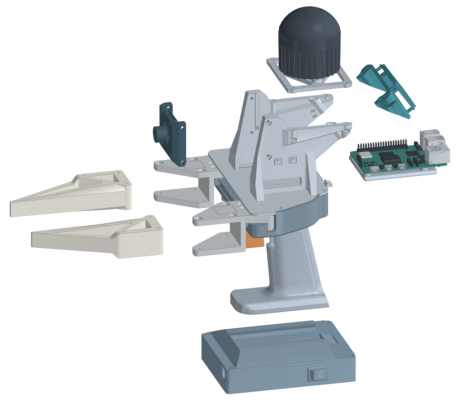
The pipeline has four stages:
| Stage | Where | Output |
|---|---|---|
| Collection | Two handheld grippers | Each gripper's raw wrist video, LiDAR and IMU data |
| Processing | Server, in parallel in the background | 6-DoF trajectory per hand, gripper opening, aligned timeline |
| Dataset | Server | LeRobot-format dataset synced to Hugging Face |
| Training and deployment | Training machine plus two YAM arms | Fine-tuned pi0.5 or MolmoAct2 running on the robot |
The key division of labour: the grippers only record, and all reconstruction and preparation is queued on the server, so neither waits for the other.
What is on the gripper, and why?
Each gripper carries a LiDAR with a built-in IMU (an inertial sensor measuring acceleration and rotation), a global-shutter ultrawide camera and a Raspberry Pi 5. The camera records wrist views at 30 frames per second. It is ultrawide because the system has no overhead camera, so the wrist view must capture the workspace and its surroundings.
Why a LiDAR? Something has to measure how the gripper moves through space. The original UMI estimated trajectories from camera plus IMU; other systems use external trackers. UMI-Live has each gripper run SLAM (simultaneous localisation and mapping) on its own LiDAR and IMU, rebuilding the surroundings while working out where it is. No equipment is set up on site and no per-environment calibration is needed.
How is the opening measured? Two ArUco tags (printed black-and-white markers a camera can locate) sit on the moving finger mounts. Open fingers put the tags far apart in the image, closed fingers put them close. The server converts the tags' angular separation in the fisheye image, plus the fixed camera geometry, into a physical width, then maps it to 0 to 1 using calibrated fully-closed and fully-open positions.
The fingers were also redesigned: a rigid plastic base takes the load and a thin soft layer conforms to object shape, helping with small items such as screws. The same fingers are mounted on the YAM arms (a lightweight arm from i2RT; the paper uses two for robot tests), so demonstrator and robot use the same fingers.
Integration has a cost. Table 1 reports 1.42 kg per unit with battery, 1.5 hours per charge, and 1,930 dollars of hardware per pair.
What does the server do after recording?
One button starts and stops both grippers, and a screen shows recording and upload status. Finished takes are transferred to the server and queued.
The first step is checking synchronisation. The two grippers are separate devices, and if their clocks disagree the two hands' motions are misaligned. During recording, the two Pis align their clocks with Chrony (a network time-sync tool), and each LiDAR is synced to its Pi with gPTP (a precise time-sync protocol for local networks). The server checks these records and drops any take whose estimated offset between devices exceeds 5 milliseconds. For example, if a hand moves at about 0.5 metres per second during a handover (illustrative), 5 milliseconds is a 2.5 millimetre misalignment, and much more would affect grasping.
The second step is computing trajectories. The server runs LiDAR-plus-IMU SLAM separately for each gripper, then applies a fixed offset to convert the sensor's motion into the trajectory of the point between the fingertips. The paper calls this point the TCP; it is what the robot controls during execution.
The third step is alignment and storage. Poses and openings are interpolated onto the frames of one camera. Each hand's pose is recorded relative to where it was at the start of the take: 7 numbers per hand (position, rotation, opening), 14 for both. After integrity checks the take is saved in LeRobot format and synced to Hugging Face.
These steps follow a dependency graph: decoding, SLAM and opening estimation run as soon as their inputs are ready, with up to 5 concurrent jobs in Figure 6, and only dataset writing is serialised. Interrupted processing resumes from completed stages.
How does handheld data transfer to the robot?
A person holding the grippers and a robot holding them are at completely different absolute positions: the person may stand in a living room while the robot is bolted to a lab bench. Training on absolute coordinates would make the two data sources disagree.
UMI-Live has the policy predict only relative motion. Its inputs are the two wrist images, the two gripper openings and a task instruction, with no poses or joint angles. Its output is an action chunk: for the next 24 steps at 30 per second, how each hand should move and rotate relative to its current pose, and how wide each gripper should be. At execution the robot applies these relative motions to its own current fingertip pose and converts them to joint commands with inverse kinematics.
A small example (illustrative): the policy says the left hand should move 3 centimetres forward at step 10. In human data this is 3 centimetres from where the hand was; on the robot it is 3 centimetres from where the arm is now. Both describe the same thing. Teleoperation data gets fingertip poses from joint angles through forward kinematics and is converted the same way, so both sources mix directly. Hoot says

Positions only
- Left map
- 3 cm along map x
- Right map
- 3 cm along map y
- Problem
- Same move, two readings
Rotated into fingertip axes
- Left
- 3 cm along fingertip forward
- Right
- 3 cm along fingertip forward
- Result
- Independent of map direction
Robot executes
- Start
- Current fingertip pose from joint angles
- Target
- 3 cm along its own fingertip forward
- Then
- Inverse kinematics gives joint commands
Illustrative: a hand moves 3 centimetres forward along the gripper. The left column is the raw position difference in each gripper's own SLAM map, which differs because the maps point different ways; the middle column rotates it into the current fingertip axes, so both agree; the right column is the robot chaining that relative move onto its own current fingertip pose. Source: paper Appendix F: future poses are expressed relative to the current pose, with the translation rotated by the transpose of the current rotation; Appendix G: robot target pose = current fingertip pose × predicted relative pose
One easy-to-miss point is coordinate axes. Each gripper runs its own SLAM, so each has its own axes, and "forward" in one map is not "forward" in the other or at the robot base. The paper expresses every future move and turn in the axes of the current fingertip pose: subtract the current position, then rotate by the current orientation. So "3 centimetres forward" means along the gripper's own forward direction, whatever way the SLAM map happens to point. On the robot side, the authors give the YAM arm a fixed flange-to-fingertip transform whose axes follow the UMI gripper convention. At run time the robot computes its current fingertip pose from joint angles and chains the predicted relative motion onto it. From demonstration to deployment, the reference is always the fingertip at this moment, so nobody needs to know how the SLAM map relates to the robot base.
What do the experiments show?
The task is to put all 6 oranges on a table into a bowl with both arms. Orange and bowl positions are randomised, success requires all 6 in the bowl, and regrasping and recovering dropped oranges are allowed. Each condition gets 10 trials. The training pool holds 296 handheld demonstrations and 75 teleoperation demonstrations collected in the test scene. The handheld demonstrations were recorded elsewhere, under different lighting.
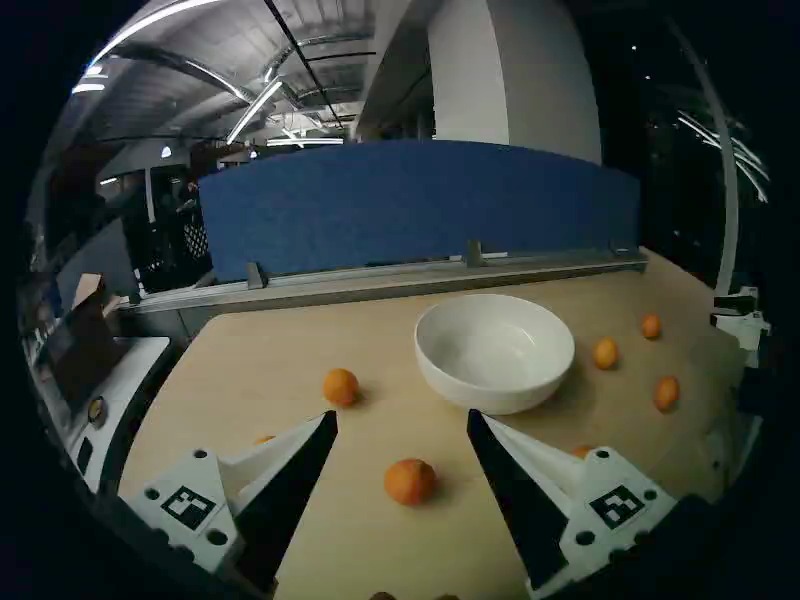
| Policy | Training | Handheld / teleoperation share | Successes |
|---|---|---|---|
| MolmoAct2 | Released checkpoint, no fine-tuning | — | 0/10 |
| pi0.5 | Fine-tuned | 95% / 5% | 9/10 |
| pi0.5 | Fine-tuned | 90% / 10% | 10/10 |
| MolmoAct2 | Fine-tuned | 75% / 25% | 8/10 |
The table shows that mixtures dominated by handheld data can train policies that finish the whole task on a real robot. The percentages are what the paper calls each source's share of the fine-tuning mixture, summing to 100%; the mixture is drawn from the 296 handheld and 75 teleoperation demonstrations above, not from extra collection. With robot data at a 5% share, pi0.5 succeeded in 9 of 10 trials. The released MolmoAct2 checkpoint, already trained for this two-arm YAM robot, never succeeded, and fine-tuning raised it to 8, so the data supplied a task skill the released model lacked.
How much the handheld data contributes on its own is a question this experiment cannot answer. The authors state that there is no handheld-only or teleoperation-only comparison. The 5% to 25% of in-scene data may be exactly what lets the policy adapt to the new environment.
Limitations as I see them
First, the evidence covers one task. The authors state that evaluation has one task, 10 trials per condition and one training seed per condition. Nine versus ten successes out of 10 cannot be separated statistically, and the released pouring and towel-folding tasks get no robot evaluation.
Second, the key control is missing. The authors acknowledge there is no handheld-only versus teleoperation-only comparison, so the two sources' roles cannot be separated. Whether the 75 teleoperation demonstrations alone could do the task cannot be read from the table.
Third, the collection experience is not measured. At 1.42 kg per unit and 1.5 hours per charge, holding the grippers for long sessions is not light work. The authors also note that LiDAR reconstruction quality depends on scene geometry and motion The evaluation centres on robot success rates, so anyone planning large-scale collection will need to measure trajectory accuracy, processing speed and operator efficiency themselves.
How a robotics team could try it
Step one: build one pair, record a few dozen demonstrations of your own task, and look only at the pipeline: how many takes are dropped for synchronisation, and whether the reconstructed trajectories look smooth when plotted. This is cheap and quickly reveals whether the LiDAR reconstructs reliably in your environment.
Step two: add the missing control. Train the same task on handheld-only, teleoperation-only and mixed data, and test each a few dozen times. Only then do you know how much robot collection the handheld data saves.
Step three: if it works, scale to several sites, track how many valid demonstrations you collect per hour, and compare the cost with teleoperation.
Verdict
The bottleneck in data collection is not only hardware; what happens after recording also decides how much you can collect, and UMI-Live makes both reproducible engineering.
| Dimension | Assessment |
|---|---|
| Problem importance | High. Expensive real-robot data is a main bottleneck in robot learning |
| Method novelty | Medium. Each component has precedent; the contribution is integration and open release |
| Evidence | Weak. One task, 10 trials per condition, no handheld-only control |
| Engineering cost | Medium. About 1,930 dollars per pair, with hardware, software and build guides open |
| Worth trying | Yes. Teams building handheld collection can start from it directly |
How did this read for you?
Hoot made a note. Thanks for the feedback.

One tap, no sign-in; tap again to undo. Only anonymous counts are kept, never who you are.
Discussion
Add experiment details, reproduction notes or a different take. Requires a GitHub sign-in.
Loading the discussion…