Contents · 6 sections
1Three offline steps turn a PDF into a directory tree2Index files are the map, relation files are the links3Four ordinary commands work through the question49 and 4.3 points above the strongest baseline, but not on every question type5Removing grep hurts most, and on DeepSeek every reduced variant falls below no file system6About 8 times faster reasoning, with build tokens counted separatelySHARE

DocFS does not design a new retrieval interface for the agent: it rebuilds a long PDF as directories and files, and lets the agent use the ordinary commands ls, grep and read_file to locate evidence, expand along recorded relations, and finally check against the source PDF.
The paper studies long multimodal document question answering: an agent gets a PDF of dozens of pages and a question, and must find the evidence inside to answer. Of the two benchmarks, MMLongBench-Doc holds reports and manuals averaging 47.5 pages; FinRAGBench-V holds 301 financial reports averaging 76.1 pages. The evidence may be one sentence of body text, one cell of a table, or one bar of a chart.
One question runs through this piece (illustrative, its structure taken from a real case in the paper): in a 76-page financial report, "what was the company's stockholders' equity in 2019?" Intuition says the balance sheet. But this balance sheet lists only the two most recent years and has no 2019 column; the 2019 figure sits in a separate stockholders' equity table further on. To answer, the agent must know which section holds the table, whether the table is a screenshot or text, and that the two tables are related. The paper names these three needs the section hierarchy, heterogeneous content elements and cross-modal associations.
One family of methods encodes the document as page-level visual representations or flat content units, then gathers evidence through retrieval or iterative exploration. Search this question with "stockholders' equity 2019", and the top hit is likely the balance-sheet page, because the whole page is about equity. After reading it, the agent finds no 2019 column and can only rephrase and search again; these representations offer no section hierarchy or cross-modal relations to follow. Another family first builds content trees or multi-granularity indexes, but those structures mostly serve retrieval, and what reaches the agent is still retrieved evidence; others pair the structure with a dedicated operation interface, a different one per system. The paper sums it up: the structure exists, but tools aligned with it are missing.
DocFS answers with a plain file system: directories express hierarchy, and ls, grep and read_file are tools already aligned with directories. With Qwen3.5-Plus as the backbone, it reaches 71.6% and 82.3% accuracy on the two benchmarks, 2.9 and 4.3 points above DocLens, the strongest training-free baseline, and its reasoning runs about 8 times faster. In the ablation, removing grep costs the most.
Three offline steps turn a PDF into a directory tree
The pipeline has four steps; the first three run once per document offline, and only the last runs when a question is answered.
| Step | Input | What it does | Output |
|---|---|---|---|
| Parse | Source PDF | MinerU (an open-source PDF parser) splits each page into text, titles, figures, tables and equations, keeping page numbers and coordinates | A list of elements with page numbers |
| Refine | Parse results | An LLM rebuilds the title hierarchy; a VLM checks screenshots to fix equation LaTeX and table HTML | A correct section tree and table content |
| Build | Refined elements | Sections become directories, content is stored by type, and index, relation and image-description files are written | The file system, plus the source PDF |
| Answer | Question and file system | The agent uses four file tools to locate, expand and verify | The answer |
The refine step exists so the directories actually have levels. Illustrative: a parser often labels both "5 Financial Statements" and "5.2 Consolidated Balance Sheet" as top-level titles, and building directories directly then yields twenty-odd flat folders, as if no hierarchy had been built. The LLM also turns body text misread as titles back into body text.
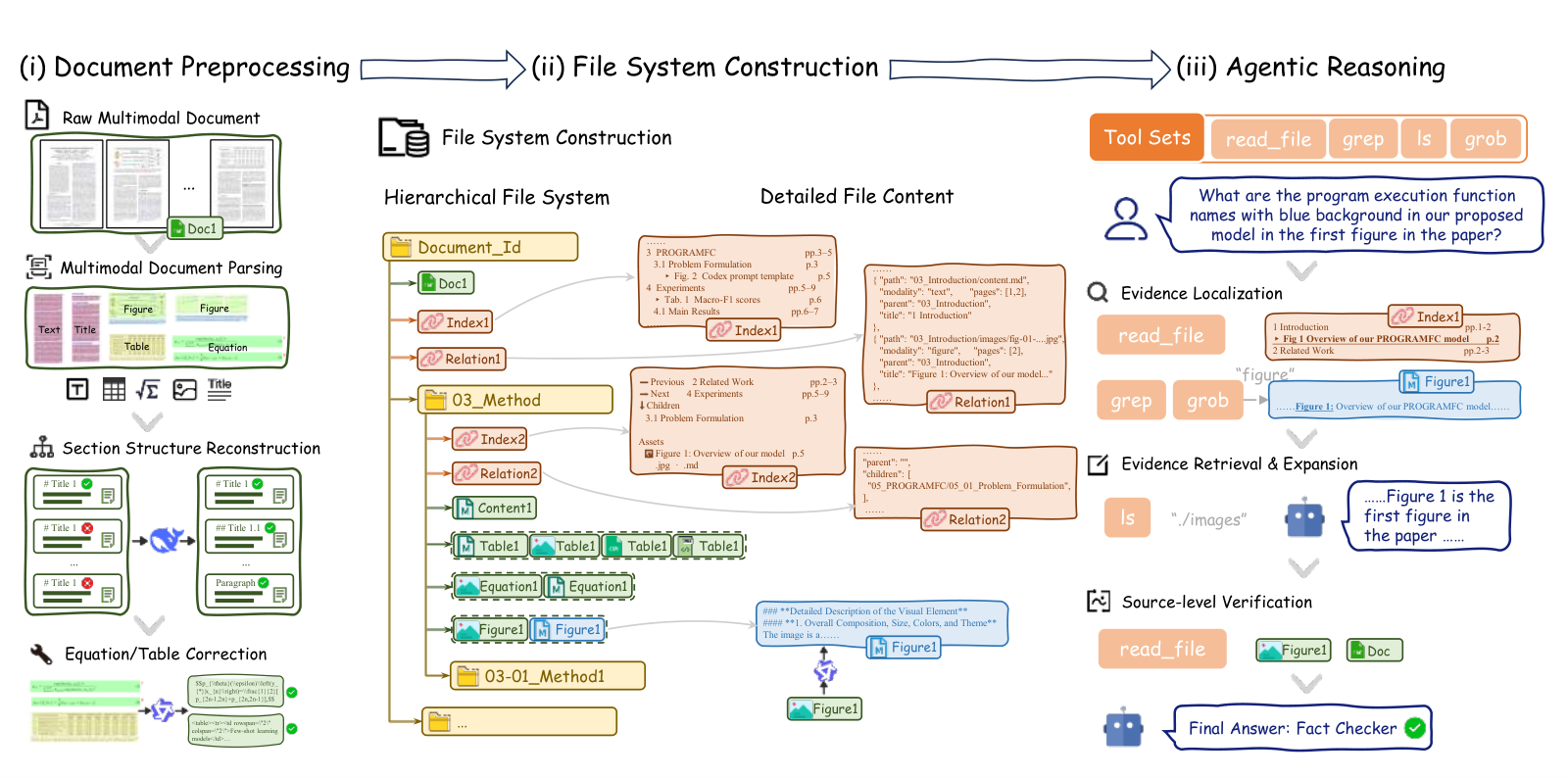
Once built, the report looks roughly like this (illustrative). Body text is stored as Markdown, tables as a screenshot plus CSV and HTML, and the source PDF stays at the root for verification:
annual_report/
├── index.md          <- whole-document index
├── relation.json     <- whole-document relations
├── source.pdf
└── 05_Financial_Statements/
    ├── index.md      <- section index
    ├── relation.json
    ├── 05-02_Consolidated_Balance_Sheet/
    │   └── content.md  table1.jpg  table1.csv  table1.html
    └── 05-04_Stockholders_Equity/
        └── content.md  table1.jpg  table1.csv  table1.html
Index files are the map, relation files are the links
Directories alone are not enough. Illustrative: a document has 8 sections of 5 subsections each; to see its whole structure, the agent must ls the root and then each section, 9 calls in total. The root index.md writes all 40 subsections and their pages into one file, so one read suffices. Following the format in the paper's figure, it looks like this (illustrative):
5 Financial Statements                 pp.70-80
  5.2 Consolidated Balance Sheet       p.75
    > Tab. Consolidated Balance Sheet  p.75
  5.4 Stockholders' Equity             p.77
    > Tab. Stockholders' Equity        p.77
Relation files record relationships between sections, between sections and assets such as figures and tables, and among assets of different modalities. One record looks roughly like this (illustrative):
{"path": "05_Financial_Statements/05-04_Stockholders_Equity/table1.jpg",
 "modality": "table", "pages": [77],
 "parent": "05_Financial_Statements", "title": "Stockholders' Equity"}
The root directory and every section directory each hold one index and one relation file; the root pair covers the whole document, and a section's pair covers that section. A section index also lists the previous section, the next section, the subsections and the section's assets. The paper calls these two kinds of files structure description files.
Images need one more thing. grep only searches text, so once a "2017-2021 revenue" bar chart is stored as an image file, grep cannot find it. DocFS has a VLM write a text description for each image and stores it next to the image. The description only lets grep hit the image; exact values still come from opening the original image, because the description may miss details.
Four ordinary commands work through the question
The agent has only four tools. read_file reads text and images, and for the source PDF it accepts a start and end page; grep searches all files by keyword and returns matches with their paths; ls lists a directory; glob matches paths by pattern. The agent is built on the open-source DeepAgents framework, keeps its official tool set with small adaptations, and gets no task-specific interface.
The run on the report question looks roughly like this (illustrative, structure taken from the case in the paper's Figure 4):
read_file("index.md")          -> section 5 is the financial statements
grep("2019 total stockholders' equity")  -> no match
read_file(".../05-02_Consolidated_Balance_Sheet/table1.jpg")
                               -> only 2020 and 2021 columns
grep("2019")                   -> hit in 05-04_Stockholders_Equity/content.md
read_file(".../05-04_Stockholders_Equity/table1.jpg")
                               -> reads the 2019 year-end balance
read_file("source.pdf", page_start=75, page_end=77)
                               -> source pages match both tables; answer
The first two lines locate; the middle three retrieve candidate tables, where the first lacks a 2019 column and a second grep switches to the stockholders' equity table; the last line verifies. Verification matters because the CSV and the descriptions both come from parsing and may be wrong. Illustrative: a misaligned parse puts the 2019 figure under the 2020 column in the CSV, so reading only the CSV gives a wrong answer; the source-page screenshot is immune to that error.
2.9 and 4.3 points above the strongest baseline, but not on every question type
The two benchmarks score differently. MMLongBench-Doc has 1,082 questions, 20.6% of which have no answer in the document, and is scored by rules; FinRAGBench-V has 1,394 questions judged by an LLM. The strongest comparison is DocLens, a training-free method that narrows from the whole document to relevant pages and then to figure and table elements within them. The authors reran DocLens with the same two backbones; the other baselines are scores reported elsewhere, with differing backbones.
| Method | Backbone | MMLongBench-Doc accuracy | F1 | FinRAGBench-V accuracy |
|---|---|---|---|---|
| DocLens | Qwen3.5-Plus | 68.7 | 66.1 | 78.0 |
| DocFS | Qwen3.5-Plus | 71.6 | 70.0 | 82.3 |
| DocLens | DeepSeek-V4.1-Flash | 67.8 | 66.1 | 74.4 |
| DocFS | DeepSeek-V4.1-Flash | 69.7 | 67.5 | 82.3 |
This shows the gain survives a change of backbone and is larger on financial reports (+7.9 with DeepSeek). The Qwen3.5-Plus baseline that takes page screenshots and OCR text directly scores 66.6 on MMLongBench-Doc, 5 points below DocFS.
Split by evidence type, Qwen3.5-Plus on MMLongBench-Doc gains most on chart questions (68.0 vs 58.7, +9.3) and text questions (+6.9), which shows the gain concentrates on questions whose evidence sits in charts and body text.
DocFS also loses some categories: unanswerable questions at 73.7 trail DocLens at 75.4, layout questions at 68.4 trail the Qwen3.5-Plus baseline that takes page screenshots and OCR text directly (71.3), and FinRAGBench-V table questions at 79.9 trail DocLens at 83.3. This shows it is not stronger on every type; judging that the document has no answer, and reading layout, remain weak spots.
Removing grep hurts most, and on DeepSeek every reduced variant falls below no file system
The ablation has two groups: remove one part of the file system, or remove one tool. "No file system" means answering directly from the parse results.
| Variant | Qwen: MMLongBench-Doc / FinRAGBench-V | DeepSeek: MMLongBench-Doc / FinRAGBench-V |
|---|---|---|
| Full DocFS | 71.6 / 82.3 | 69.7 / 82.3 |
| No file system | 66.6 / 78.8 | 64.4 / 71.9 |
| No preprocessing (hierarchy and tables unfixed) | 66.7 / 80.6 | 58.7 / 81.6 |
| No structure description files | 66.3 / 79.8 | 59.3 / 79.8 |
| No image descriptions | 66.9 / 79.8 | 58.7 / 81.9 |
| No grep | 62.0 / 74.0 | 56.6 / 79.8 |
| No ls | 66.6 / 80.9 | 58.9 / 81.8 |
On Qwen, removing grep drops MMLongBench-Doc by 9.6 points, the most of any variant. The authors' explanation: without global search, the agent must descend the directory tree level by level and guess which file holds the answer, so evidence in distant sections is easily missed. Back in the report question, the second grep("2019") becomes impossible, and the agent has to guess on its own that the 2019 figure is in section 5.4.
Removing image descriptions hurts mainly questions that need images: Qwen drops 11.3 on charts and 7.3 on figures, DeepSeek 15.8 and 10.8. This matches why the authors added descriptions: a description lets grep find the image, and the original image supplies the values.
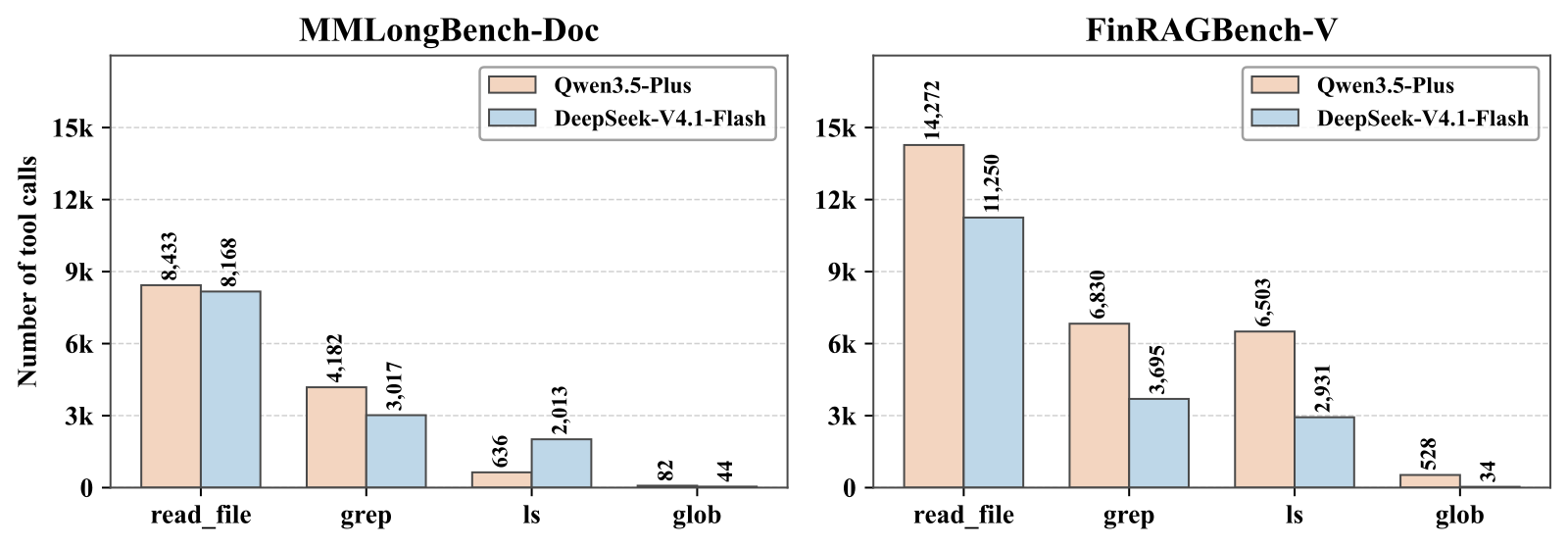
Tool call counts agree with the ablation: read_file is called most, grep second, and glob is almost never used.
One pattern in the DeepSeek column is my own reading of the table. On MMLongBench-Doc, removing any single part or tool leaves accuracy between 56.6 and 59.3, below the 64.4 of no file system at all. My interpretation is that for this backbone, a file system missing one piece may be harder to use than plain parse text.
On Qwen, removing grep is likewise lower (62.0 vs 66.6, 74.0 vs 78.8), removing structure descriptions is slightly lower on MMLongBench-Doc (66.3 vs 66.6), and the other variants are close to no file system. This shows that on both backbones, a file system without grep does worse than using the parse results directly.
About 8 times faster reasoning, with build tokens counted separately
Comparing the reasoning stage against DocLens, Qwen3.5-Plus on MMLongBench-Doc cuts mean time per question from 359.9 s to 43.9 s and tokens from 217.9K to 142.9K; on FinRAGBench-V, from 436.1 s to 52.7 s and from 602.4K to 185.0K tokens. DocLens's tokens grow 2.8 times on the denser reports, while DocFS's cost changes little between the two benchmarks. This shows that on these two benchmarks, DocFS's mean reasoning time and token use vary little.
That account leaves out the build. The build uses several other models and amortizes to 14.5K (MMLongBench-Doc) and 122.5K (FinRAGBench-V) tokens per question. With everything counted, Qwen3.5-Plus uses 157.4K and 307.5K tokens per question, and DocLens's 217.9K and 602.4K are about 1.4 to 2.0 times that. Build time depends on parsing concurrency, so the authors compare only reasoning time.
Amortization assumes several questions per document, and FinRAGBench-V averages 4.6 per report. By my estimate, if a report gets only one question, about 567.3K build tokens plus 185.0K reasoning tokens exceed DocLens's 602.4K, which means DocFS suits documents that are asked about repeatedly.
Back to the opening question: DocFS does not replace search. After the first grep misses, the agent uses grep("2019") to find the stockholders' equity table, then turns back to pages 75 and 77 of the source PDF to verify.
How did this read for you?
Hoot made a note. Thanks for the feedback.

One tap, no sign-in; tap again to undo. Only anonymous counts are kept, never who you are.
Related papersMore from Paper Daily
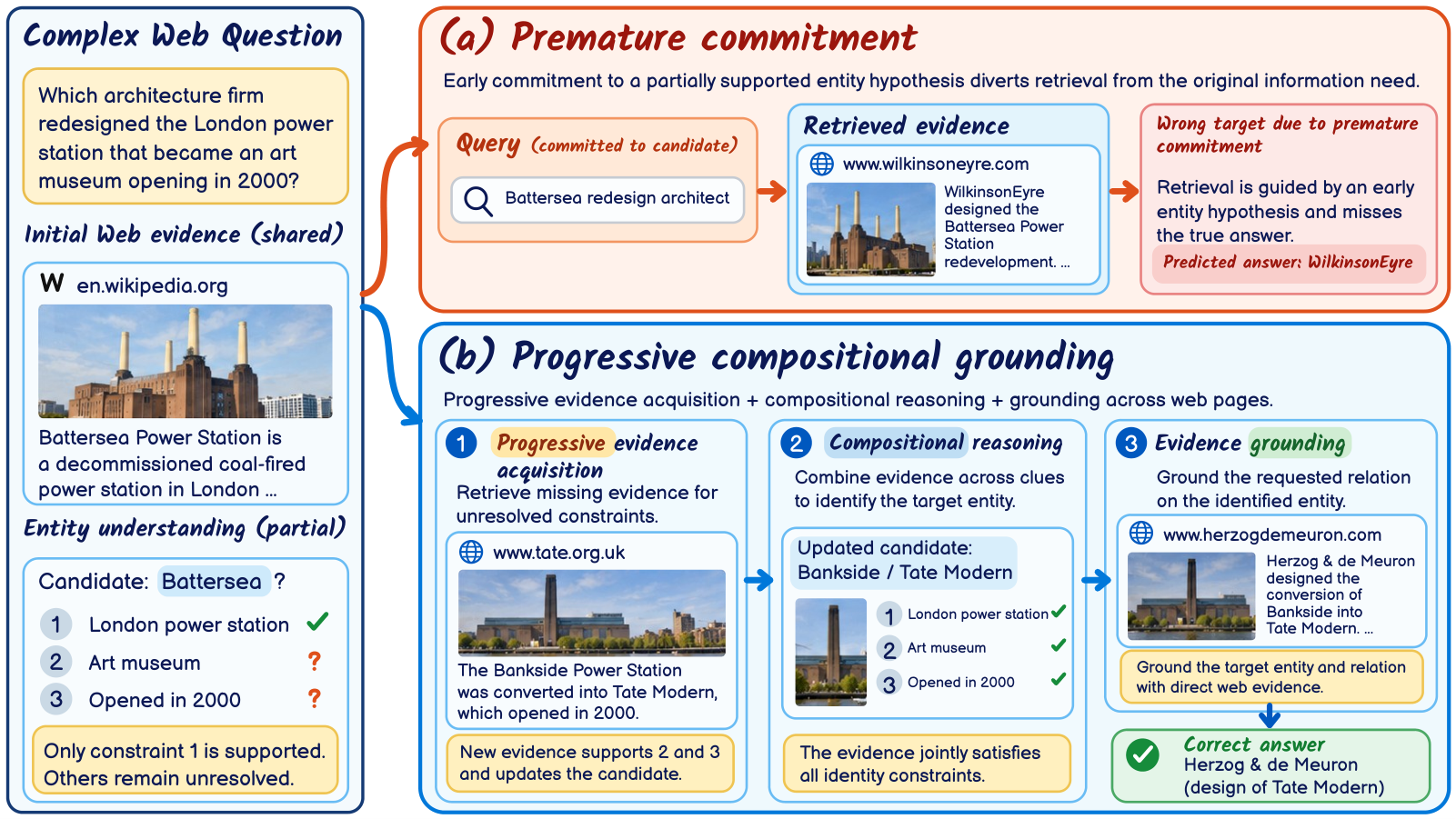 Retrieval · 2026-11-13PCG-RAG: Progressive Compositional Grounding for Retrieval-Augmented Generation in Complex Web Question AnsweringComplex web QA often requires first working out who or what several clues describe, then looking up an attribute of it, and a common mistake is to treat a name as settled after only one clue matches. The paper's example is a London power station converted into an art museum: a system that settles on Battersea from London and power station alone retrieves an architect who actually belongs to a dif…
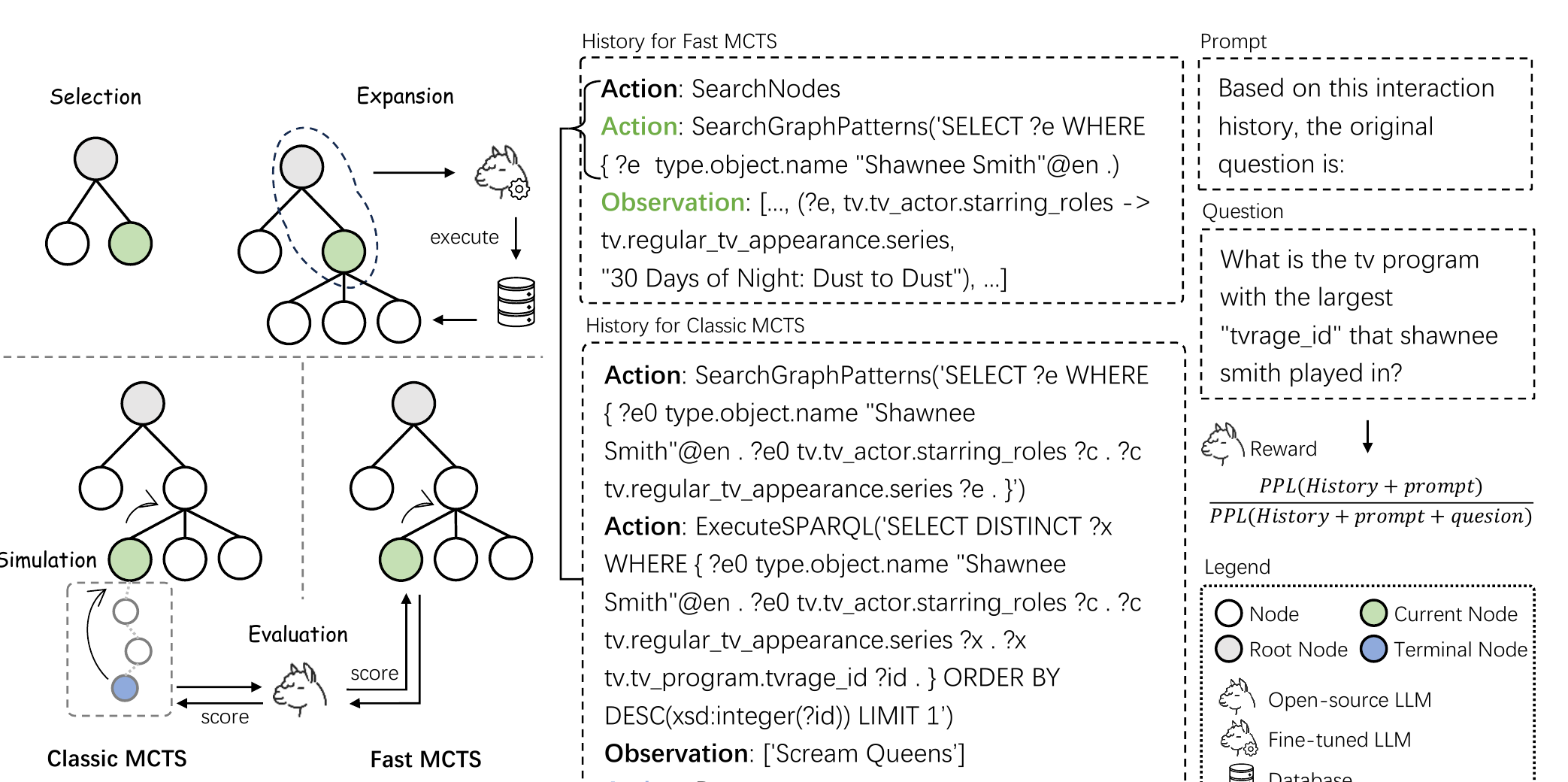 Retrieval · 2026-11-04MCTS-KBQA: Monte Carlo Tree Search with Information Gain Rewards for Knowledge Base Question AnsweringWhen an LLM uses MCTS to find answers step by step over a knowledge base, intermediate steps can be given useful scores without training a reward model and without simulating to the end. The method gives the query history up to that step to an open instruction model and computes the perplexity of that history with and without the original question attached. The more the perplexity drops once the…
 Retrieval · 2026-10-27Beyond Post-Hoc Rewards: Privileged Reasoning Exploration for Multimodal EmbeddingsSome multimodal embedding models first have the model write reasoning about the input and then embed it along with the input, producing richer vectors. But training data only says which pairs are relevant, never what reasoning to write, so exploring from the input alone rarely finds reasoning that actually helps retrieval. PILOT has one multimodal LLM play two roles: one writes reasoning from the…
Discussion
Add experiment details, reproduction notes or a different take. Requires a GitHub sign-in.
Loading the discussion…